I worked at a place early in my career where we never did code reviews. It wasn’t even a thing on anyone’s radar; not the devs, not management, not leadership. It created a lot of problems for us. In one memorable example I spent six days on a task that should have taken twelve hours. It took me all of that extra time to refactor some truly bizarre code.
We all know that every dev thinks they need to refactor all of the code they touch. That wasn’t how I operated though. In this case it was literally the faster option. This was C# .net framework code for an internal website. The dev duplicated database operation code over and over, and returned the results in ListItem arrays (a UI element) back to the caller.
We were tasked with making significant enhancements to the application which involved database changes. The app as it stood was one big mess of combined dependencies. The data access layer had UI details and vice versa, and the business logic was scattered through the UI and data layers. We unwound this, fixed bugs in the process, and made our changes. It was an avoidable mess if code reviews had been used to enforce standards.
I’ll settle for absence of evidence
When using the UI of that app, there were signs that something ugly was living underneath. It manifested as incorrect UI behavior, slowness, unresponsiveness, and operations that had no effect.
After fourteen rounds of changes to the product I’m now working on, yesalittle.com, I have one initial observation – the app works really well. It’s a positive indication for the code, even if it’s just absence of evidence of an issue.
Code reviews or art critiques
Later in my career code reviews became a regular rhythm in the development cycle. A common problem in code reviews is that you have human developers with feelings, writing code which is half art half science, being reviewed by other humans with strong opinions. I have seen these end in raised voices and red faces. In the latter half of my career I was leading most code reviews. It gave me the benefit of setting the tone that we were not in the meeting to nitpick style or unquantifiable alternate approaches. A working product was our primary yardstick.
It’s a different world entirely today. AI coding agents are highly skilled at writing code when provided a good specification. A junior developer is not writing the code. A checked out mid-career developer uninterested in improving their mediocre skills is also not writing the code. The dedicated senior engineer who just can’t possibly absorb an entire language, also not writing the code.
Not having to brace myself for what a junior dev created is great. I also don’t have to brace for their reaction to my feedback.
Code Review: yesalittle.com
reviewing AI-generated code
This review covers the React single page app which consists of six component files, seven general purpose typescript files, and a JSON file containing the data structure of prompts and responses. The project is small at ~2,553 lines of written code. The JSON file is 4,370 lines.
Given the small code base I could have started anywhere and this review would be manageable. I chose to start by reviewing the defined data types, and then work my way through each react component from the top down. As I reached calls to helper utilities in the plain typescript files, I would dig into those.
Findings
BUG: Native Translation Fails To Render
This was the only true bug impacting the operation of the app, and how it was found is worth mentioning. This was not spotted in the code review, but in a manual run through of the app. It only impacted Spanish speakers who are learning English phrases. Those learners should see a screen like this where the parts boxed in red give them the phrase translated in their native language. The bug was preventing those from displaying.
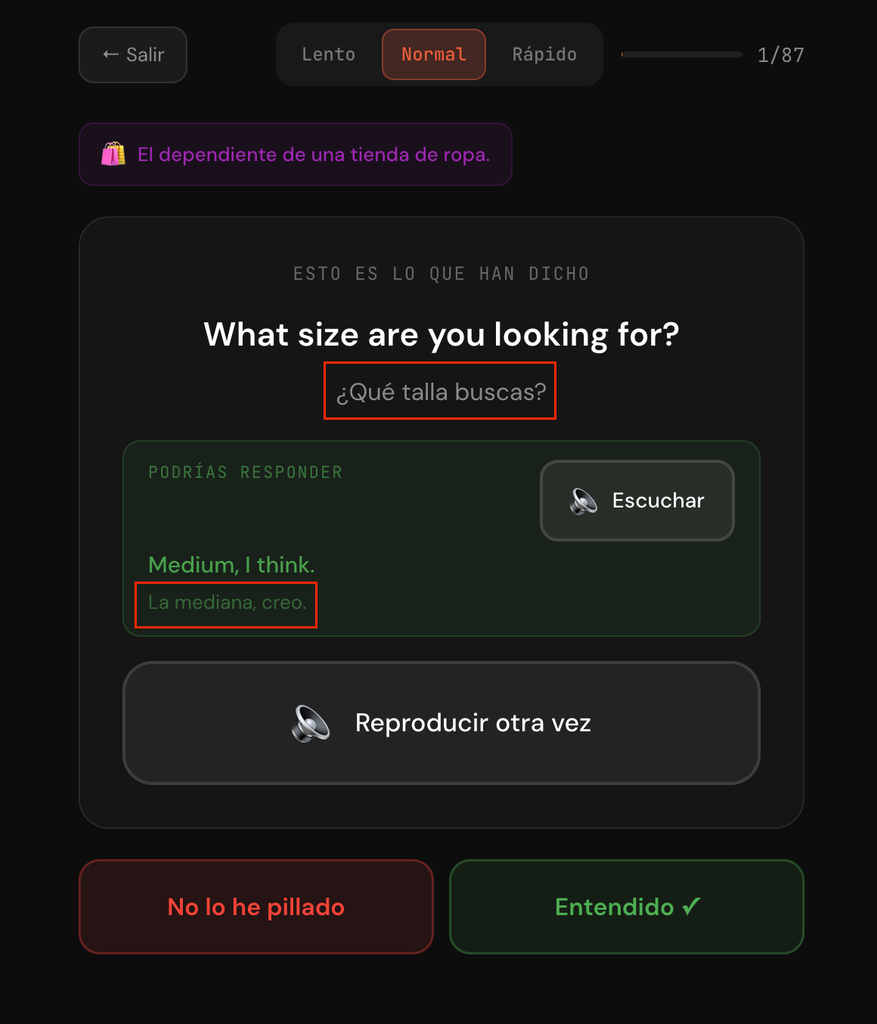
The root cause of this was an artifact hanging around from the original creation of the app. At that time, the learner’s language was only English, which resulted in English being hard-coded.
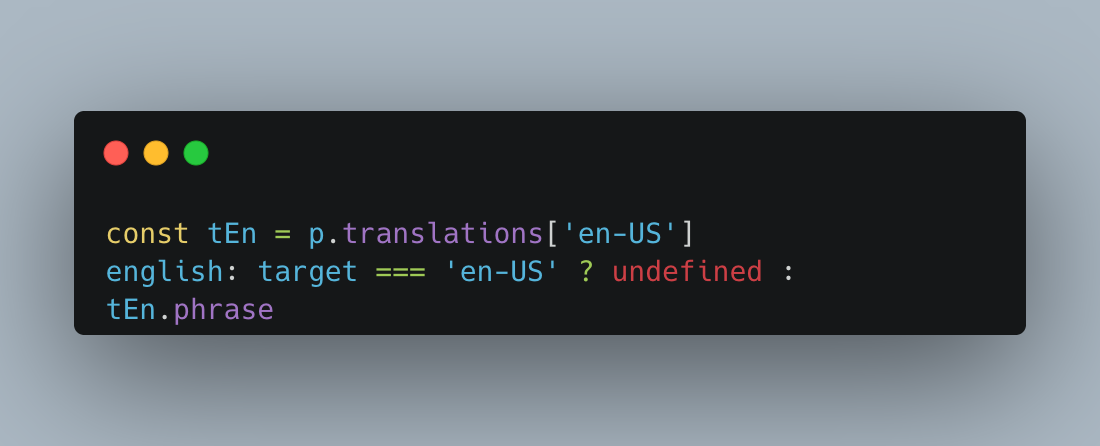
const tEn = p.translations['en-US']As the app evolved I added support for Spanish speakers to learn English. Combine this with defensive logic hanging around from the creation of the app, to prevent displaying translations if the target language is English, and you get translations not showing up.
english: target === 'en-US' ? undefined : tEn.phraseI had Claude fix and deploy this bug immediately given the severe learning impact for Spanish speakers. Claude Code mentioned that the variable names played a role in the mishap, with them having names indicating English. Those names encoded a since falsified assumption about the app, that the learners were only native English speakers.
BAD PRACTICE: Double Cast Preventing Compiler Type Check
The code in App.tsx contained a double cast that appeared unnecessary. The UnifiedScenario object is modeled after the “scenarios” property in the JSON data. Claude Code first casted the JSON as unknown before casting it again as the correct type. This prevents the compiler from catching mismatches between UnifiedScenario and the JSON structure.
function buildScenarios(target: string, native = DEFAULT_NATIVE): Scenario[] {
  return (promptsData.scenarios as unknown as UnifiedScenario[])
    .map((s): Scenario => ({
When asked about it, Claude Code gave the following confirmation that the double cast is undesirable:
What the extra unknown hop buys/costs. It’s belt-and-braces. as unknown as T turns off the comparability check entirely, so it also survives drift that the single cast would catch — e.g. someone adds a required field to UnifiedScenario that no scenario in the JSON has, or renames categoryName. The flip side is exactly that: it will keep compiling silently when the JSON and the type genuinely diverge, whereas as UnifiedScenario[] would fail the build and point at the drift. Given buildScenarios already throws at runtime on shape violations (the phrase-on-scenario and missing-phrase checks just below), the compile-time check is arguably the more useful of the two guards.
Styles
I haven’t passed judgement on this one yet, so I’ll call it an observation. Claude put most of the styling inline on the html elements. I would have placed it in style sheets. I’m open to the possibility that style sheets may be a human efficiency construct. When an AI agent can easily make styling changes across a bunch of inline styles, are style sheets still necessary?
                <div
                  style={{
                    marginTop: 12,
                    padding: '8px 12px',
                    background: 'rgba(255,255,255,0.03)',
                    border: '1px solid rgba(255,255,255,0.08)',
                    borderRadius: 10,
                    fontSize: 13,
                    color: 'rgba(255,255,255,0.4)',
                    lineHeight: 1.5,
                    textAlign: 'left',
                  }}
                >
                  <span style={{ marginRight: 6 }}>ℹ️</span>{current.gloss}
                </div>
Thirty inline copies of the same padding is now cheap to change. On the other hand, thirty inline copies of the same hex code where five mean “warning” and twenty-five are your brand color is a conflation no amount of find-and-replace can recover. With style sheets the intent would have been encoded.
Positive Observations
Defensive Logic
Claude code added defensive logic in places without being asked to do so. The following example enforces that JSON objects have the right types of properties on them. Mixing these properties up in the JSON is easy, and this would surface the issue if it happened.
          const tNative = p.translations[native]
          if (promptType === 'scenario' && t.phrase !== undefined) {
            throw new Error(`Scenario prompt ${p.id} has a phrase field in ${target} — remove it from prompts.json`)
          }
          if (promptType === 'conversation' && !t.phrase) {
            throw new Error(`Conversation prompt ${p.id} is missing phrase in ${target}`)
          }
Properly Succinct Or Verbose
I found a couple contrasting cases that I thought showed good judgement. In the first one, Claude wrote a very succinct line to get the count of selected prompts using array methods. These shortcuts are often missed by people (including me) and more verbose approaches are used.
const totalPrompts = selected.size === 0
    ? scenarios.reduce((sum, s) => sum + s.prompts.length, 0)
    : scenarios.filter(s => selected.has(s.id)).reduce((sum, s) => sum + s.prompts.length, 0)
In other areas I have seen Claude being more verbose for clarity. On the practice screen it duplicates some of the buttons between the scenario prompts and the conversation prompts. The code was easier to follow because of that.
Overall Thoughts
The app was very efficiently written with the proper breakdown of components and the minimum code to accomplish the task. I found the code very easy to follow, even including helpful comments. Most importantly the app works great for my personal use case, and all use cases after fixing the mentioned bug. If a human had written this code I would have told them they did a great job.